One of the key features in WebTextEditor is its block-less user interface concept. With this concept, WebTextEditor allows users to perform various actions without interrupting their editing process.
Task Pane is implemented to support this concept, providing a resizable and extensible container that can be used for multiple purposes without blocking the page. Multiple contents can be included in Task Pane, and users can easily switch between pane modes and implement individual behavior for each mode.
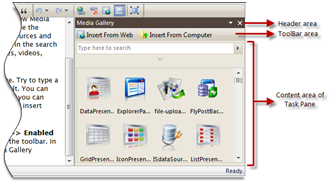
WebTextEditor includes three built-in task pane modes: Media Gallery, Table Designer, and Form Control. These three panes can be opened from the related commands in main toolbar when Complete toolbar mode is activated.

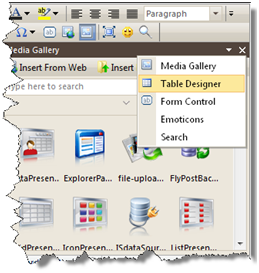
Another alternative is to use context menu options in Task Pane header. All available pane modes will be listed as the context menu items, so user can easily switch between pane modes using this menu.